Allotment planner app · UK
Allotment planner app: every bed, and what it needs this week
Vercro is built for allotment holders. Add your beds and what’s growing in them, and it keeps the record of your plot, shows it as a plan, and each morning tells you the few jobs worth doing.
Free. Not a free trial. No card required.
Running an allotment is complicated
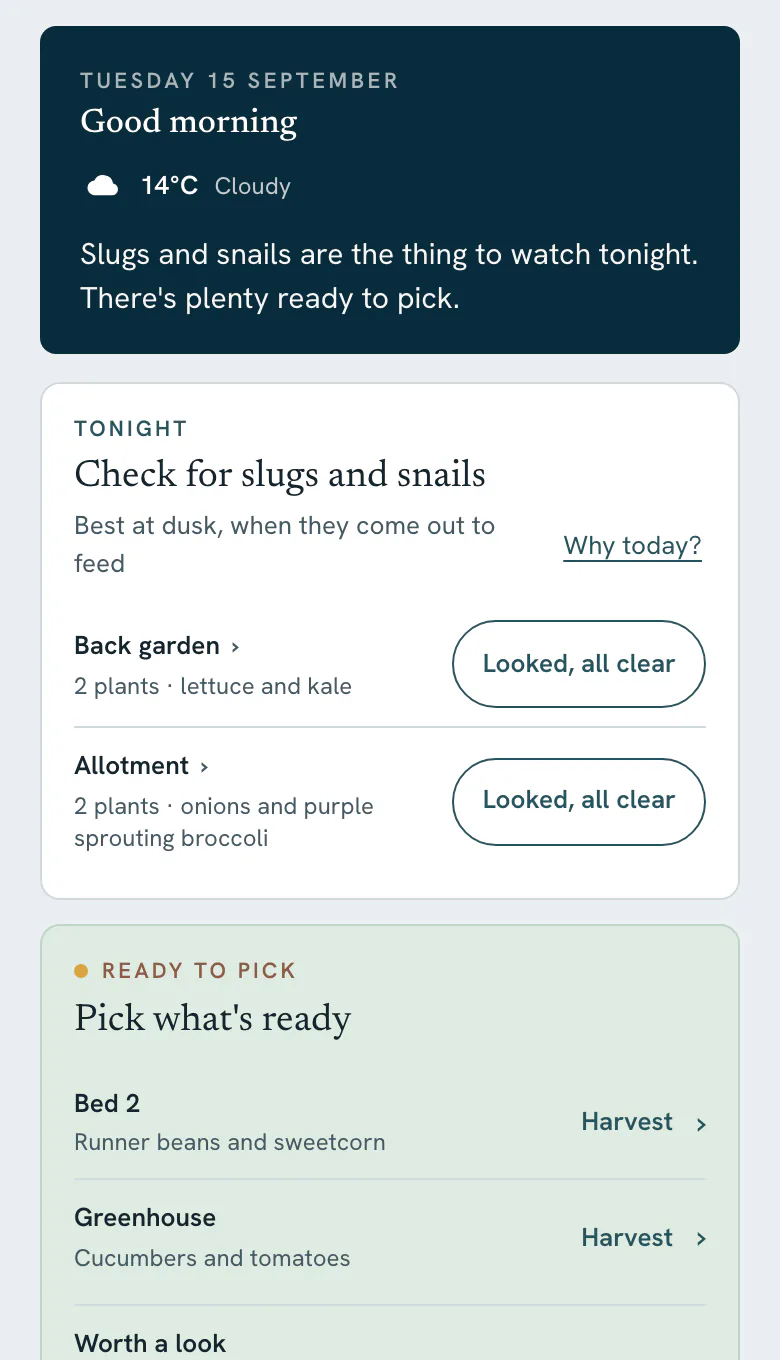
An allotment isn’t a single patch, it’s a system: several beds, dozens of crops, different sowing windows, successional sowings and jobs happening all season. Keeping it in your head, or on scraps of paper, works until it doesn’t.
Vercro gives you one place for all of it: your beds, your crops, what grew where, and each morning a short list of what actually needs doing now.
“First year growing from seed and getting an allotment — amazing app”
“genuinely put the enjoyment back into managing my allotment”
Your plot
What Vercro does for allotment holders
Every bed and area
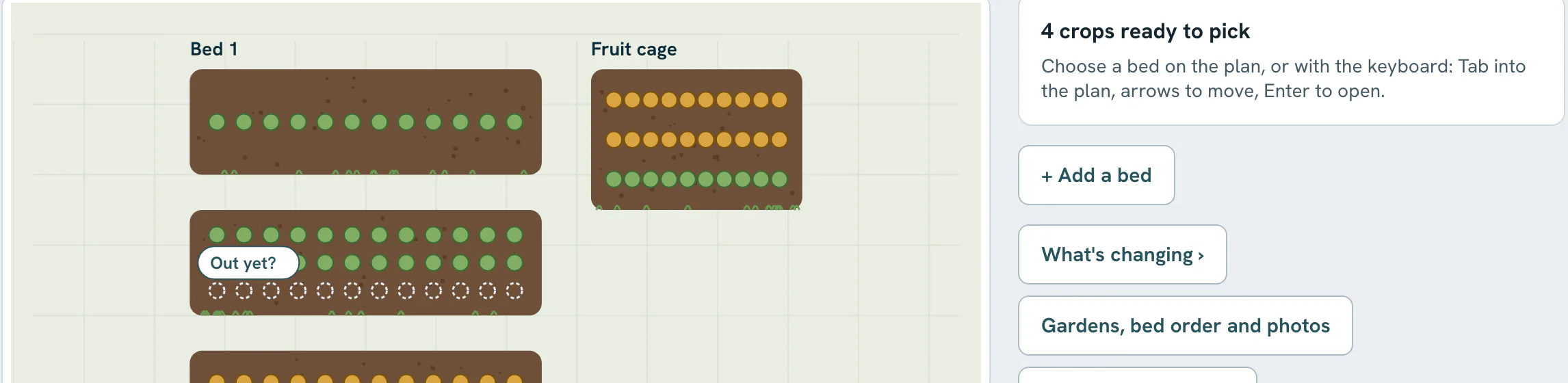
Raised beds, open ground, a greenhouse or polytunnel, containers. Add crops to each and see them by place.
The plot as a plan
Now, this autumn and next spring. Add bed sizes, roughly is fine, and it draws them to scale.
Today, each morning
The few jobs that matter, grouped by bed, each with a short reason, worked out from your crops and your postcode’s forecast.
Harvests and the season
Log what you pick by weight or count. The Record keeps it, bed by bed, and doesn’t reset in January.
Through the year
The allotment growing calendar
Every season on a plot has its own work. Here is roughly how the year runs; Vercro’s morning jobs follow your own crops through it.
Winter and early spring
Planning beds, ordering seed, early sowings under cover and getting the soil ready.
Spring
Sowing in earnest, hardening off, transplanting, early pest checks and successional sowing.
Early summer
Planting out, watering, thinning, earthing up and the first harvests.
High summer
Picking at peak, feeding, training, keeping an eye on disease and filling gaps.
Autumn
Late harvests, storing crops, clearing beds, green manures and planning next year.
Late autumn and winter
Overwintering crops, mulching, mending and looking back on the season.
Month by month in more detail: allotment jobs by month.
The free plan
Free. Not a free trial
Gardening has enough costs already. Three gardens, unlimited crops, your growing history and daily personalised guidance, with no card and no clock running down.
No card required.
Free
£0
Everything you need to run your garden.
- Up to 3 gardens or allotments
- Unlimited crops, beds and seasons
- Today, every morning, with a short reason on every job
- Why today? for the full explanation behind a job
- Your Garden plan: now, this autumn and next spring
- Your Record: what you sowed, did and picked, bed by bed
- 25 Ask Vercro questions a month
- 5 Plant Checks a month
Ask Vercro questions and Plant Checks come back on the 1st of every month. Nothing else on Free is metered.
Frequently asked questions
What does an allotment planner app need to do?
Hold the whole plot, bed by bed, and keep up with it through the season. Vercro keeps every bed and what is growing in it, shows the plot as a plan for now, this autumn and next spring, and each morning shows the few jobs that matter, with a reason.
Does Vercro help with crop rotation on an allotment?
It keeps a record of what grew in each bed, so you can see what was where when you plan. It does not plan the rotation for you or give rotation warnings. For an empty bed, “What could go here” lists crops that still have time to grow.
Can I manage several allotment beds in Vercro?
Yes. Add as many beds and growing areas as you have, including raised beds, open ground, a greenhouse or polytunnel, and containers, and add crops to each one. Crops and beds are unlimited on Free.
Is the allotment planner free?
Yes. Free is a plan, not a free trial, with no card required. It covers up to 3 gardens or allotments, so a plot and a garden at home fit easily. Pro adds unlimited gardens.
Does it work if I only have a small plot or a half plot?
Yes. It works from a single raised bed to a full plot. The more of your crops and beds you add, the more the morning jobs reflect your plot.
Related guides
Set up your allotment in Vercro
Add your beds and a few crops. Tomorrow morning, Today will have looked at them.
Free. Not a free trial. No card required.
Works in your phone’s browser, no download needed. Already have an account? Log in.
One tap · No password · Straight into your garden
Also on iPhone and Android. The newest version of Vercro reaches the web app first.
Vercro Ltd · Companies House 17113010 · ICO ZC113623